AI won't build a fashion brand for you. AI tools for fashion entrepreneurs can speed up product copywriting, help generate and refine design concepts, and support marketing workflows. But AI-generated designs often need hands-on editing, and people still need to judge whether the work fits the product and the brand.
That’s the practical opportunity: use AI to work faster without giving up creative direction. AI tools for fashion entrepreneurs can help draft product descriptions, explore visual ideas, and develop campaign concepts, while your taste and commercial judgment shape the final result.
This guide explains where AI fits in fashion design and marketing, how to get more useful outputs, and what to watch for with AI-generated imagery. You’ll also learn how to choose tools around real business needs, so experimentation strengthens your brand systems instead of becoming another distraction.
Key Takeaways
- Shape product-copy prompts around verified product details and your brand voice to create drafts that are easier to refine.
- Use generated design concepts to explore directions, then edit them with a clear eye for what can work as a finished product.
- Choose AI tasks that solve a real workflow bottleneck, and keep human judgment in control of customer-facing decisions.
- Review AI-generated campaign images against the actual product so the final visuals set accurate expectations.
AI copywriting for product descriptions and marketing
AI can turn product facts into first drafts of descriptions, emails, and campaign copy. Adore Me and other brands using AI to optimize product descriptions have reported saving dozens of hours. Use that time for sharper editing, not as a reason to publish unchecked text.
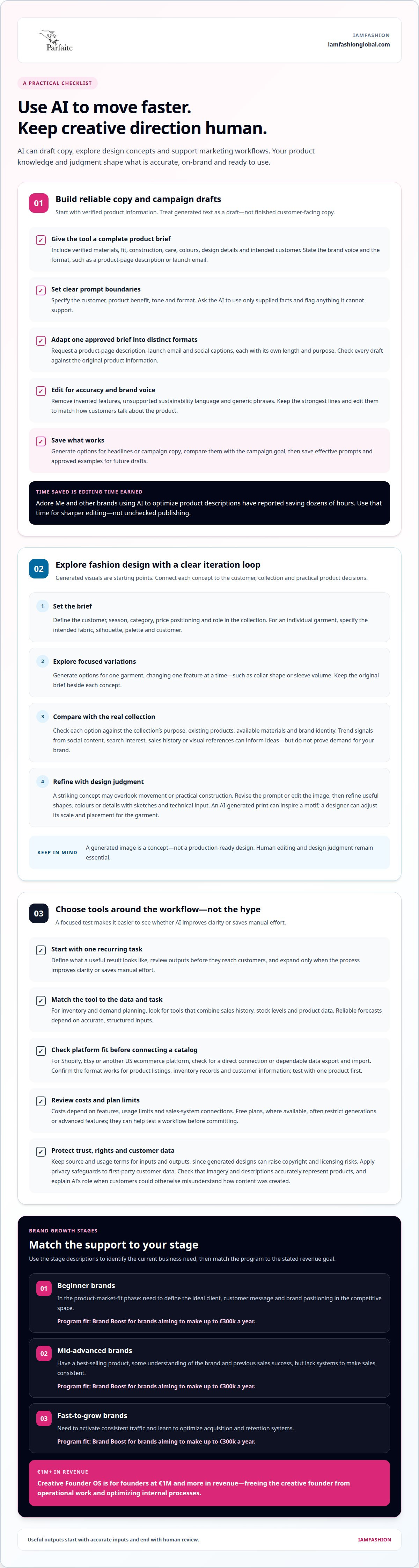
Start with a clear product brief. Give the tool verified details about the garment’s materials, fit, construction, care, intended customer, and brand voice. Specify the format, such as a product-page description or launch email. For a linen shirt, provide its actual fabric, cut, available colours, and design details. Ask the AI to use only those facts and flag anything it can’t support.
Build a repeatable prompt around four choices: the customer, the product benefit, the tone, and the format. For example: “Write a concise product description for a customer seeking versatile workwear. Use a confident, minimal tone. Include the verified fit and fabric details, and avoid adding claims.” This gives the draft direction while keeping brand judgment in your hands.
Next, adapt one approved product brief into distinct marketing formats. Ask for a product-page description, a launch email, and social captions, each with its own length and purpose. Check every draft against the original product information. Remove invented features, unsupported sustainability language, and phrases that could describe any brand. Keep the strongest lines, then edit them to match how customers actually talk about the product.
Use AI to generate options, not make the final decision. Create alternative headlines or calls to action, then compare them with the campaign goal. For a new collection, check whether each version highlights the intended design detail or customer need. Save effective prompts and approved copy examples so future drafts start closer to your brand standard. A controlled workflow delivers the value: accurate inputs, useful options, and a human editor who protects consistency.
AI-generated fashion design and design iteration
Trend-forecasting platforms can help fashion brands spot patterns and plan collections. Look for tools that analyze social content, search interest, sales history, or visual references. Pair those signals with your knowledge of your customers. A rise in searches for oversized tailoring, for example, can inform a concept, but it doesn’t prove demand for your brand.
For design exploration, generative image tools can turn prompts and reference images into visual directions. Describe a specific item, such as a cropped jacket with sculptural sleeves, and specify its intended fabric, silhouette, palette, and customer. Generate variations, then identify the strongest details. Treat each image as a concept, not a production-ready design.
Use a clear iteration loop. Start with one design brief, generate a small set of alternatives, and compare each with the collection’s purpose. If a coat concept looks striking but overlooks movement or practical construction, revise the prompt or edit the image. AI can’t make every concept into a finished product, so manual editing and design judgment remain essential.
For collection planning, connect each visual direction to a commercial decision:
- Set the brief: define the customer, season, category, price positioning, and collection role.
- Explore: generate options for one garment, changing one feature at a time, such as collar shape or sleeve volume.
- Select: compare the options with existing products, materials, and the brand’s visual identity.
Keep the original brief beside each generated concept. Record which prompts produced useful shapes, colours, or details, then refine them with sketches and technical input. For example, an AI-generated print can inspire a motif, while a designer adjusts its scale and placement for the actual garment. This makes iteration purposeful: the tool expands possibilities, and the design team decides what belongs in the collection.
Making the most of AI tools for a fashion brand
AI tool costs depend on features, usage limits, and connections to your sales systems. Free plans, where available, often restrict generations or advanced features, so they can be useful for testing a workflow before committing.
For inventory and demand planning, look for tools that combine sales history, stock levels, and product data. Forecasting can inform reorder timing and collection decisions, while supply-chain planning features can help organize supplier and production information. Reliable outputs depend on accurate, structured inputs.
Launch an online clothing brand with a focused sequence: define the customer and product range, use AI to draft product copy and campaign concepts, build a storefront, then review each item before publishing. Keep product facts, brand positioning, and customer expectations consistent across every step.
Copyright and licensing risks can arise when generated designs draw on copyrighted work, so retain the source and usage terms for inputs and outputs. For personalization, organize first-party customer data and apply privacy safeguards. Make sure campaign images and descriptions don’t misrepresent products, and explain AI’s role when customers could otherwise misunderstand how content was created.
For Shopify, Etsy, or another US ecommerce platform, select tools that connect directly or support a dependable data export and import workflow. Confirm that product listings, inventory records, and customer information transfer in a format your store uses. Test the setup with one product before connecting a whole catalog.
Keep your first AI workflow narrow: choose one recurring task, define what a useful result looks like, and review outputs before they reach customers. For example, use sales and inventory data to inform a reorder decision, then compare the recommendation with supplier lead times and your collection plan. Expand only when the process improves clarity or saves manual effort.
Costs vary with features, usage limits, and connections to sales systems. Free plans may be available, but often limit generations or advanced features, making them useful for testing a workflow.
Choose tools that connect directly to Shopify, Etsy, or your other ecommerce platform, or support a dependable data export and import workflow. Check that listings, inventory records, and customer information use compatible formats, then test the connection with one product.
What AI tools generate fashion product photos, models, and campaign imagery?
Image-generation tools can create campaign concepts, virtual models, and product-scene variations from prompts or source photos. They help brands explore settings, lighting, and styling before committing to a shoot. Start with one product and a defined purpose, such as testing a campaign direction or creating a social post.
Match the workflow to the image you need. A background editor can place a product photo in a new setting, while a generative image tool can create a broader campaign concept. Virtual-model tools can show garments on generated figures. Each approach needs different inputs, so prepare clear product images and describe the intended mood, pose, crop, and channel.
Accuracy comes first. AI-generated marketing images may not represent the products in the original photos accurately. A sleeve, print, colour, or fit can shift during generation. Compare each result with the real garment, then remove or correct images that could mislead shoppers. Keep product-page visuals especially faithful to the item customers receive.
Use this review sequence before publishing a generated visual:
- Match the item: compare colour, shape, print, details, and fit with the actual product.
- Check the context: make sure the pose, styling, and setting suit the campaign and intended customer.
- Review the format: crop the image for its channel and inspect key details at full size.
- Approve the final: have a person review the image beside the product photography.
Fashion imagery has already included AI-assisted creative work. Casablanca Paris collaborated with photographer and AI artist Luke Nugent on an AI-generated Spring / Summer 2023 campaign. That example shows how a brand can use generated imagery as part of a deliberate campaign concept, rather than treating it as a substitute for product truth. Build a visual brief with your campaign goal, brand cues, and product references. To turn experimentation into a consistent brand workflow, develop a practical AI marketing strategy that keeps creative direction and commercial decisions connected.
IAMFASHION
IAMFASHION helps fashion founders turn creative ideas into stronger online businesses through Brand Boost and Creative Founder OS. Choose support that matches your brand’s stage, not just your latest tool.
For beginner brands still seeking product-market fit, the priority is defining an ideal client, customer message, and position in a competitive market. Support can also suit mid-advanced brands with a best-selling product and past sales but no systems for consistent revenue, as well as fast-growing brands working to build steady traffic and improve acquisition and retention.
Creative Founder OS helps free creative founders from operational work and optimize internal processes.
Contact IAMFASHION to discuss which stage best describes your brand and which program fits your next move.
Turn AI experiments into a stronger brand system
The next move isn’t adding another platform. Decide which business decision you want AI to improve, then connect that task to a repeatable workflow. For example, set a standard for reviewing campaign concepts, product information, and customer responses. This keeps experimentation tied to brand priorities instead of creating more disconnected work.
AI tools for fashion entrepreneurs work best when creative direction and business discipline go hand in hand. Choose an application that supports your current objective, decide who approves the result, and use what you learn to refine the next iteration. Review practical outcomes, such as clearer product choices, more coherent campaigns, or smoother handoffs between creative and commercial work. This approach protects the distinctiveness customers recognize while making your processes easier to build on.
Ready to align your creative ambition with a sharper business strategy? Discuss an AI strategy for your fashion brand and identify a practical next step for your business.
Build deliberately, stay curious, and make every tool serve the brand you’re creating.
Frequently Asked Questions
What are the best AI tools for fashion entrepreneurs in 2026?
The best AI tools for fashion entrepreneurs in 2026 depend on the task you need to improve. Start with a tool category, not a popularity ranking: image generation for visual concepts, writing assistance for campaign drafts, or analytics support for interpreting business data. A useful choice fits your existing workflow, handles your inputs clearly, and gives you outputs your team can review and use.
Which AI tools help with fashion design, mood boards, and tech packs?
Image-generation tools can help you explore silhouettes, palettes, and references for mood boards, while design software helps edit and organize those concepts. Tech packs need more precise garment information, including measurements, construction details, and materials. Use AI to structure notes or clarify a brief, then have a fashion professional check technical details before production. A visual concept alone isn’t a production document.
Which AI tools write product descriptions, social posts, and marketing campaigns for fashion brands?
General-purpose writing assistants can draft descriptions, social captions, email copy, and campaign variations from a structured brief. For a capsule wardrobe launch, you might request separate versions for an announcement, a product page, and a customer email. Choose tools that let you guide tone and format, then edit each draft for your brand language, audience, and channel. Keep final claims grounded in accurate product information.
How do AI tools for fashion design compare in features, ease of use, and output quality?
Compare tools by the job they support: prompt-based image generation offers quick visual exploration, while editing-focused software gives you more control over existing artwork. Ease of use depends on how clearly you can specify a garment and refine results. Judge output quality by how well the concept reflects your brief, brand identity, and practical design needs, not by visual polish alone.
What AI tools support inventory management, demand forecasting, and supply chain planning for fashion startups?
Look for inventory and forecasting tools that combine sales history, stock levels, and product data. Supply-chain planning features can help organize supplier and production information.
Which AI tools integrate with Shopify, Etsy, or other US fashion ecommerce platforms?
Choose tools that connect directly to Shopify, Etsy, or another ecommerce platform, or support dependable data export and import. Check that listings, inventory records, and customer information use compatible formats, then test the connection with one product.