A creative founder operating system turns priorities into clear processes, decision rights, meeting rhythms, and measurable initiatives. It helps your team move from evidence to decisions and action, while leaving room for creative judgment. The goal isn’t to control every choice. It’s to clarify important decisions and make routine work less dependent on you.
Creative work thrives on instinct, but a growing business can’t rely on instinct alone. When every decision, handoff, or next step runs through the founder, momentum stalls and good ideas struggle to produce consistent results.
This guide explains how to document essential workflows, give meetings a clear purpose, and connect initiatives to owners and milestones. You’ll also learn how decision rights and simple operating rhythms help your team act with confidence, spot problems earlier, and protect the time and attention creative work demands.
Key Takeaways
- Document the workflows that matter and give each one a clear owner, so routine work doesn’t depend on the founder.
- Give recurring meetings one clear purpose and use a steady rhythm to spot blockers and make decisions.
- Turn the bigger vision into initiatives with owners, milestones, and visible progress, so priorities become actionable work.
- Choose project tools that make tasks, ideas, and decisions easy to see, while leaving creative judgment with the people closest to the work.
Process documentation and meeting cadence
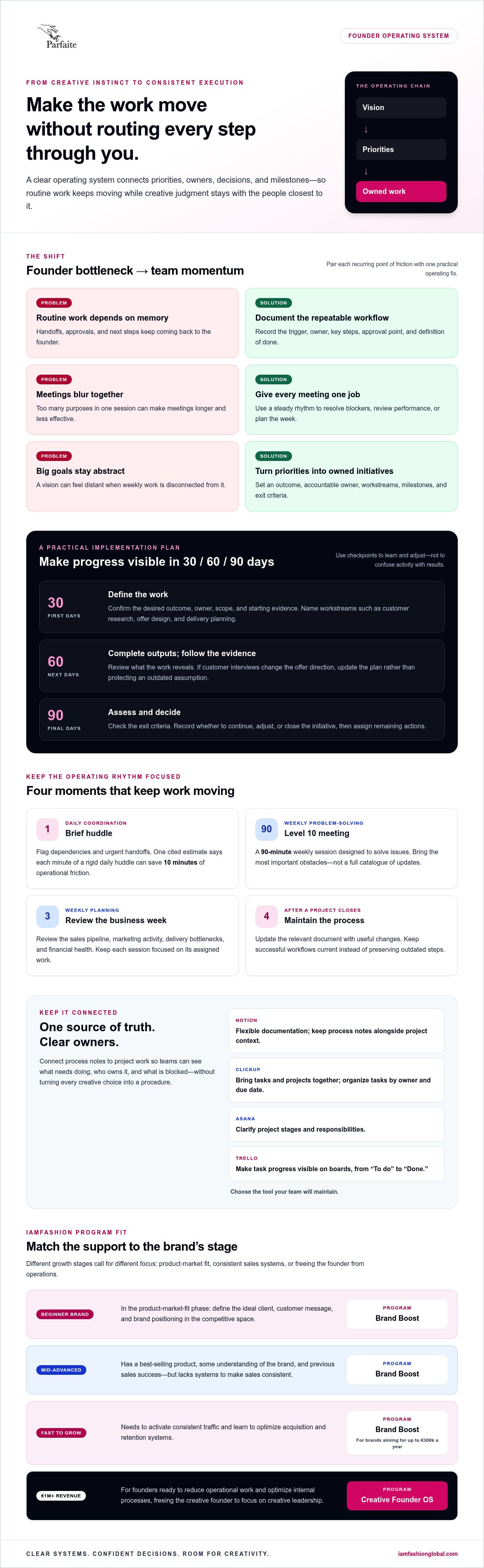
Notion works well for flexible documentation, while ClickUp brings tasks and projects together. Asana organizes project workflows, and Trello makes task progress visible on boards.
Document repeatable work before it depends on memory. Start with one process, such as preparing a product launch. Record its trigger, owner, key steps, approval point, and definition of done. Naming an owner keeps responsibility clear when work crosses roles. For a launch, the marketing lead might own the schedule, while design and operations own their deliverables.
Build your operating structure around decisions, not meetings for their own sake. Give each recurring meeting one clear purpose, such as resolving blockers or reviewing performance. Meetings that combine too many purposes can run longer and achieve less. A weekly operating review should compare the plan with reality, then assign actions to remove obstacles.
- Daily coordination: Use a brief huddle to flag dependencies and urgent handoffs. One cited estimate says each minute of a rigid daily huddle can save 10 minutes of operational friction.
- Weekly problem-solving: A Level 10 meeting is a 90-minute weekly session designed to solve issues. Bring the most important obstacles, not a full catalogue of updates.
- Weekly planning: Review the sales pipeline, marketing activity, delivery bottlenecks, and financial health across the week. Keep each session focused on its assigned work.
- Process maintenance: After a project closes, update the relevant document with useful changes. Keep successful workflows current instead of preserving outdated steps.
Choose software based on what your team needs to see. In Notion, keep process notes alongside project context; in ClickUp, organize tasks by owner and due date. Asana can clarify project stages and responsibilities, while Trello cards can show a simple flow from “To do” to “Done.” The best tool is the one your team will maintain.
Use one shared system as your source of truth. For example, link a launch checklist to its project board, name one accountable owner, and review open blockers at the weekly meeting. This connects documentation to execution without turning every creative decision into a procedure.
Building initiatives and milestones
A three-year vision gives strategic initiatives a destination, not just a deadline. Translate that vision into annual plans, then define themes to guide choices. For example, a fashion brand aiming to encourage repeat purchases might make customer retention its annual theme. Each initiative should show how weekly work advances that direction.
Create a simple template for each initiative. Name the outcome, accountable owner, workstreams, milestones, and exit criteria. A milestone shows evidence of progress, while exit criteria define what completion means. For a new customer loyalty program, an early milestone could be an approved offer structure. Exit criteria might require sign-off from the teams responsible for delivery.
Use a 30/60/90-day implementation plan to turn priorities into near-term commitments. It creates checkpoints for progress without confusing activity with results. Assign each workstream an owner, then make the next milestone visible to everyone involved.
- First 30 days: Confirm the initiative’s desired outcome, owner, scope, and starting evidence. Break the work into named workstreams, such as customer research, offer design, and delivery planning.
- Next 30 days: Complete the first defined outputs and review what the evidence reveals. If customer interviews change the offer direction, update the plan rather than protecting an outdated assumption.
- Final 30 days: Assess whether the initiative met its exit criteria. Record the decision to continue, adjust, or close the work, then assign any remaining actions.
Share milestone progress in quarterly assessments or all-associate meetings. Focus updates on outcomes, risks, decisions, and next steps. If a milestone slips, name the blocker and the person responsible for resolving it. This makes progress clear without turning a review into a lengthy activity report.
Link each initiative to the weekly work that supports it. A modular planning approach can help founders organize connected priorities without treating every project as a separate strategy. Keep the vision steady, but let evidence shape the route.
Creative operating systems as infrastructure for judgment
A founder operating system connects people, priorities, and decisions. Its value becomes clear when work still gets started even if the founder is unavailable.
Templates and Frameworks
An operating system template is a repeatable structure for turning priorities and evidence into decisions. For a creative entrepreneur, it preserves useful practices without dictating every artistic choice. One framework is SWARM: a human-centered loop of spotting, weighing, arranging, refining, and making. A team can use it to explore customer signals, weigh patterns, shape options, refine a concept, and make a considered choice.
There’s no single best template for every founder. Choose one that clarifies priorities, evidence, and decision ownership. Popular tools don’t share one price: costs vary by product and plan, so compare options with your team’s needs.
Keep the process human-led. AI can help explore ideas and surface patterns, while people decide which signals deserve attention and what the business should preserve. For example, a design team might explore a new product direction using customer feedback, then weigh that feedback against brand principles before committing. The system supports judgment; it doesn’t replace it.
Setup Risks and Mistakes
Common setup mistakes include documenting every task, changing frameworks too often, and routing routine decisions back to the founder. Each creates friction: excessive documentation is hard to maintain, frequent changes disrupt shared habits, and constant escalation slows work. Start with the decisions and workflows that shape outcomes, then expand once the team can use them consistently.
Clarify decision rights before pressure rises. For a product launch, state who recommends the direction, who decides, who executes, and who needs to be consulted. Routine choices should sit with the people closest to the work; escalation should be the exception. If employees repeatedly wait for approval or send ordinary customer issues to the founder, clarify who has authority to act.
Evaluate the system through actual decisions, not its appearance. If a new process doesn’t help the team act on evidence or resolve a recurring bottleneck, revise it. A useful framework makes the current plan visible, highlights gaps between plan and reality, and leaves creative judgment with the people accountable for the work.
Tools creative founders use for projects, tasks, and ideas
Creative founders need tools that make projects, tasks, and ideas visible. Choose a small set of tools by function: one for project ownership, one for working files, and one for visual collaboration. For example, a campaign plan needs a clear owner, deadlines, and a place for creative feedback. Connect those pieces without scattering decisions across disconnected apps.
Match each tool to a specific job. Asana or ClickUp can organize project work; Trello can display a simple task flow. Google Drive can hold shared working files, while Figma gives design teams a space to develop visual concepts together. Use each system for its strongest role instead of duplicating every detail across platforms.
- Projects: Create a campaign board with a lead, deliverables, deadlines, and approval steps.
- Tasks: Assign each action to one person and connect it to the project outcome.
- Ideas: Keep untested concepts in a separate idea backlog, then review them during planning.
- Files: Store approved assets in a shared folder, with clear names and current versions.
Set one source of truth for each type of information. If ClickUp tracks campaign status, don’t maintain a second live task list in a spreadsheet. Link to approved files instead of uploading new copies to every project. This reduces conflicting updates and helps teammates find the current decision.
Keep the system simple enough to use. Start with one active project, such as a seasonal campaign, and test the workflow from idea to approval. Notice where feedback gets lost, ownership becomes unclear, or files are hard to find. Adjust the setup to address that friction before adding tools or automation.
Review the stack when the team’s work changes. A solo founder may need a focused task board and file library; a growing team may need clearer project views and handoffs. Explore a modular approach to keep your working system aligned with evolving priorities.
IAMFASHION: Brand Boost
IAMFASHION’s Brand Boost is a comprehensive 12-month program for fashion designers and creative brand owners building and scaling online businesses.
At the product-market-fit stage, focus on defining your ideal client, customer message, and position in the competitive space. If your brand already has a best-selling product and a record of sales, your next challenge may be creating systems that support consistent sales. For brands ready to grow faster, consistent traffic and stronger customer acquisition and retention systems become key priorities.
Choose the stage that reflects your brand’s current needs, not just its ambitions. Contact IAMFASHION to explore whether Brand Boost fits your next phase.
Build a business that backs your next move
Your operating system should grow with your business, giving your team more ownership without flattening creative judgment. Treat it as a working foundation: revisit decisions, clarify responsibilities, and adjust the structure as the work changes. That’s how a creative founder operating system can support ambition without making every choice depend on you.
Choose support that matches your stage. The right next step depends on the challenge your business needs to solve now.
Explore IAMFASHION’s modular approach and consider what would help your brand move forward. Build with intention, then give your ideas room to scale.
Frequently Asked Questions
What is a creative founder operating system?
A creative founder operating system is the practical framework a founder uses to guide how the business runs and makes decisions. It connects the founder’s goals with team responsibilities, information, and recurring choices. For example, a studio deciding whether to accept a custom project can use agreed criteria for capacity, client fit, and strategic value. The framework helps turn those criteria into consistent action.
What are the core components of an operating system for creative founders?
Core components include clear outcomes, role ownership, decision rules, performance signals, and routines for reviewing work. Their value comes from how they connect. For example, a product development team might review customer feedback alongside launch readiness, so decisions reflect both market response and delivery capacity. Add only measures that help someone decide what to do next; a dashboard without decisions adds noise.
How can creative founders build repeatable workflows without limiting creativity?
Standardize handoffs and boundaries, not creative choices. For example, a brand can establish a consistent process for gathering a brief, sharing concepts, and collecting approvals while letting designers explore different visual directions. Allow exceptions when a project needs a new approach. Then capture what the team learned, so the next workflow reflects experience rather than imposing a fixed formula.
What daily and weekly routines help creative founders stay focused and productive?
Use a daily opening routine to choose the work that needs focused attention, then protect time for it before reactive tasks take over. At the end of the day, record unfinished commitments and the next action for each. In a weekly review, compare priorities with actual progress and decide what to pause, delegate, or carry forward. These bookends reduce the mental load of repeatedly deciding what deserves attention.
How should a creative founder operating system handle goals, priorities, and decision-making?
It should translate goals into a short list of priorities, then clarify who recommends, decides, executes, and contributes input. For example, a founder might set a goal to improve customer retention, while the customer experience lead proposes and owns a test of a new approach. Review evidence against the goal before changing direction. This keeps priorities connected to results while giving people doing the work authority to act.