Creative vision doesn’t scale through scattered updates. Effective fashion business workflows connect design, production, and marketing with shared product information, clear task ownership, and visible approvals. This coordination reduces duplicate data entry, organizes digital assets, and keeps decisions moving while making changes easy to track.
A strong collection takes more than good design. When details are scattered across files, messages, and systems, teams can waste time repeating work or relying on outdated information. The answer isn’t more admin. It’s a clearer way to coordinate the work.
Learn how workflows connect product decisions with production planning and marketing, what information teams need to share, and how centralized assets and structured approvals reduce friction. These systems support smoother handoffs as a brand grows, leaving more creative energy for building the business and less time spent chasing updates.
Key Takeaways
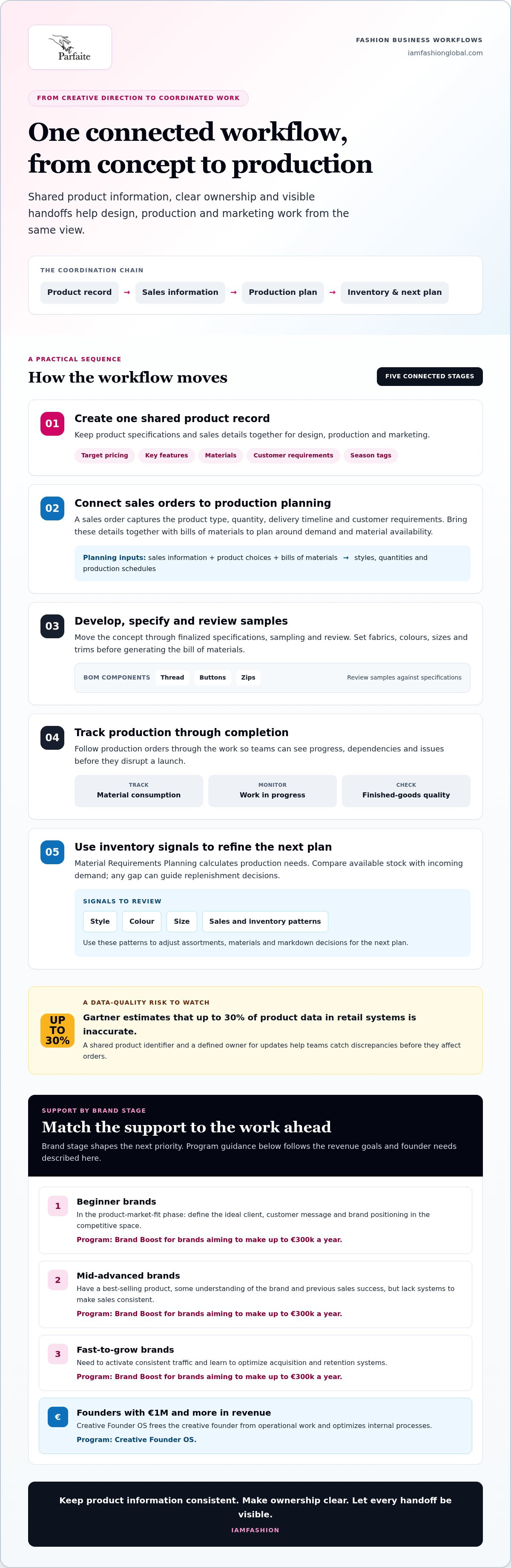
- Connect product specifications, sales orders, bills of materials, and production plans so design decisions can flow into manufacturing.
- Reduce duplicate entry by keeping product details consistent across systems and assigning clear ownership for updates.
- Organize digital assets with searchable tags and shared usage guidelines, then make approval responsibilities visible to the team.
Coordination across design, production, and marketing
Connect design decisions with production and marketing through shared product records, sales information, and clear handoffs. This gives every team a consistent view of each style as it moves from concept toward production.
Centralized Product and Sales Information
A centralized record keeps product specifications and sales details together for design, production, and marketing teams. Add metadata for target pricing, key features, materials, and customer requirements, then use tags to identify shared responsibilities. For example, a season tag helps marketing find styles while production accesses the relevant specifications. These shared reference points streamline coordination and reduce repeated questions as the catalog grows.
Sales Orders and Production Planning
A sales order records product type, quantity, delivery timelines, and customer requirements, then informs manufacturing and production planning. Teams bring these details together with bills of materials to adjust schedules for demand and material availability. Demand forecasting and assortment planning use sales information and product choices to guide which styles and quantities enter the plan. Store target pricing as product metadata, then compare expected selling prices with material and production inputs when assessing margins and markdowns.
Product Development and Production Coordination
Product development takes a concept through finalized specifications, sampling, review, and production. Finalize fabrics, colours, sizes, and trims before entering product information to generate a bill of materials, which lists components such as thread, buttons, and zips. Review samples against those specifications, then track production orders through material consumption, work-in-progress status, and finished-goods quality. This sequence makes timeline dependencies visible and helps teams address challenges before they disrupt a launch.
Forecasting, Assortment, and Inventory Workflows
Forecasting and assortment workflows use demand signals and sales orders to plan styles, quantities, and materials. Material Requirements Planning calculates what production requires and helps identify production orders and material purchase orders. Inventory workflows connect those plans with stock levels: compare available quantities with incoming demand, then use any gap to guide replenishment decisions. Review sales and inventory patterns when adjusting assortments or markdowns. Tracking trends by style, colour, and size gives teams useful signals for refining the next plan and sustaining growth.
Manual data re-entry across retail systems
Fashion businesses manage product, order, inventory, and customer records across different systems. Small brands may handle direct orders and stock, wholesalers coordinate bulk orders and retailer requirements, and retailers track store and online sales. Returns and exchanges should update inventory and customer-service records together, so staff can see an item’s status and respond consistently.
Repeatedly copying a style code, colour, or quantity creates mismatches between systems. Problems can build across thousands of SKUs and dozens of suppliers, while fragmented workflows can leave millions of dollars in revenue on the table. Gartner estimates that up to 30% of product data in retail systems is inaccurate. A shared product identifier and defined update ownership help teams catch discrepancies before they affect orders.
Independent designers and small retailers often have lean teams, so duplicate data entry takes time away from collection planning and customer support. A practical workflow assigns one source record to each product, then passes approved changes to sales and inventory tools. For example, changing a colour name once should keep it consistent in the product listing, order record, and stock view.
Luxury retailers also need accurate product details to preserve a considered customer experience. Conflicting descriptions, availability, or delivery updates can undermine the buying journey. Keep product information aligned across customer-facing channels, and route returns or exchanges through the same record used for stock updates. This gives service teams a clearer view of what happened and which options remain.
Regional collaboration adds another layer. Brands selling across markets can maintain shared product definitions while adapting customer messages and service processes to local needs. Assign an owner for core data, document regional changes, and share approved updates between teams. This preserves brand alignment without requiring every market to communicate identically.
Turn data accuracy into a growth capability, not an admin burden. For brands working toward product-market fit or more consistent sales, Brand Boost business growth support can connect operational discipline with stronger brand positioning.
Digital workflow and asset management tools
Digital workflow tools connect task ownership with product and brand assets, helping teams share files and decisions without searching separate drives. For example, tag each style by season, collection, or sustainability attribute, then add metadata for designer, fabric specifications, and compliance requirements. A campaign team can find approved imagery by collection, while product development staff locate the matching details. Shared structures keep progress visible as responsibilities shift.
Use workflow stages to show where work stands and who owns the next handoff. A design task might move from concept review to sample approval, then to marketing asset preparation. Assign a clear owner to each transition so tasks don’t stall between departments. Team leaders can spot bottlenecks when work remains in one stage and address dependencies before they disrupt a launch.
A centralized digital asset repository gives teams one organized place for logos, campaign images, product photography, and approved brand materials. Add usage guidelines and naming rules, such as collection, season, and asset type, so staff can select the right file. Shared platforms support collaboration, while compliance reviews help teams catch outdated visuals or inconsistent messaging before publication. The process is more reliable when approved versions are easy to identify.
Keep governance practical. Record supplier certifications, audit trails, and material-sourcing information alongside the relevant product or supplier record. This gives teams a clear way to respond to sourcing questions or audits. For example, connect a fabric document to the style that uses it instead of leaving it in an unlabelled folder. Define who can approve changes and archive replaced files so teams don’t mistake old documentation for current guidance.
Use automation for repeatable actions, such as routing an asset for review or notifying an owner when a task’s status changes. Keep creative decisions with the people responsible, and automate the handoffs that slow execution. This balance gives leaders more visibility without adding unnecessary process.
Email-based approvals and collaboration
Email can capture feedback, but an approval process needs a clear record of the decision. For a campaign image, identify the asset version, reviewer, requested change, and approval status in one message or shared task. Without those details, a reply such as “looks good” may not identify which image was approved. Keep the final decision connected to the exact file and campaign.
Set approval stages around real decisions: design sign-off, product information review, and marketing approval. Name one owner for each stage, define what they’re approving, and record changes before passing work forward. For example, a marketing lead can approve copy while a design lead reviews image use. This division keeps collaboration focused and makes unresolved points visible before publication.
Emerging brands can start with a consistent email subject format, such as collection name, asset type, and review status. As the team grows, move approvals into a shared workflow that tracks versions, feedback, owners, and completion. A successful launch depends on everyone using the same approved material, not separate inbox threads. Keep email for discussion, but record the decision in the shared system.
For regional teams, distinguish global brand guidance from local communication needs. A shared approval record can show which visuals or messages remain consistent while documenting region-specific edits and who accepted them. This supports alignment without requiring every market to use identical wording. It also gives leaders a practical view of decisions affecting a launch across teams.
Make approvals part of how the business operates, not an inbox chase. For founders ready to strengthen internal processes as the business scales, explore Creative Founder OS for fashion founders.
IAMFASHION: Brand Boost
IAMFASHION’s Brand Boost helps fashion designers and creative brand owners build and scale their businesses online.
Choose Brand Boost if your brand is still finding product-market fit and needs to define its ideal client, customer message, and competitive positioning. It also suits brands with a best-selling product and previous sales success but no systems for consistent sales. If your brand is ready to grow, the focus is on building consistent traffic and improving customer acquisition and retention.
It’s designed to free creative founders from operational work and improve internal processes.
Contact IAMFASHION to explore which program fits your brand’s stage.
Build the operating rhythm your next stage needs
Make your next move deliberate. Identify where work stalls, then choose one handoff to improve. Assign an owner, agree on what “done” means, and review whether the change helps your team work with less friction. Strong fashion business workflows make room for creative decisions instead of adding process for its own sake.
Keep the system useful as your brand changes. Revisit responsibilities when a new sales channel, product range, or team member changes how work flows. A workflow that fits today should be clear enough to adapt tomorrow. IAMFASHION’s Brand Boost and Creative Founder OS can support your next move, with structured mentorship and actionable workflows for fashion businesses.
Start with the operational change that would give your team the clearest focus, then build from there. Contact IAMFASHION to discuss workflows and consider a practical next step for your brand.
Frequently Asked Questions
What are the main workflows in a fashion business?
Core workflows cover product creation, sourcing, sales, fulfillment, customer care, and financial management. Consider a seasonal launch: design develops the range, sourcing secures materials, merchandising shapes the offer, marketing prepares the campaign, and operations handles orders. Finance then reviews sales and costs. Map the handoffs between these functions to find where decisions stall or ownership becomes unclear.
What are the typical fashion sourcing and supplier management processes?
Fashion sourcing usually begins with a product brief that defines required materials, construction, and quality expectations. The team identifies suitable suppliers, requests quotations or samples, evaluates fit, and agrees on order details before production starts. Maintain a supplier record with contacts, approved materials, decisions, and delivery updates. After each order, review quality and communication to inform future sourcing decisions.
What are the key workflows for fashion ecommerce and order fulfillment?
Ecommerce fulfillment connects the product listing to payment, stock allocation, picking, packing, dispatch, and customer updates. When an order arrives, for example, confirm payment, reserve available items, send the pick list, and record shipment details after dispatch. Define a clear exception process for unavailable items, address changes, cancellations, and returns, so customer service and inventory records stay aligned.
What software is used to manage fashion business workflows, and how does it compare?
Fashion businesses use different tools to meet their operational needs. Product lifecycle management software focuses on product information and development; enterprise resource planning systems connect functions such as inventory and finance; digital asset management organizes creative files. Ecommerce platforms manage online storefronts and orders, while spreadsheets support flexible manual tracking. Compare tools by the work they centralize, how they integrate with current systems, and how much duplicate entry they eliminate.